Showing posts with label Online Sites. Show all posts

Thursday, 10 November 2016

Shop online to avoid currency problems

While we heartily appreciate, the decision taken by our PM, we cannot ignore the problems it has been causing. Performing routine tasks is getting a tad inconvenient with the vendors refusing to take the old currency notes. And for those who want to shop, the wait to get the currency exchanged seems never ending. Why don’t you shop online and put an end to this problem? Here is how shopping online can help you. 


No problem of change 

So, you cannot use your 500 rupee notes anymore and the lack of small denominations is not helping either. While it is creating few problems in your routine expenses but it doesn’t have to create problems while shopping. You can easily make online payments using your credit/debit card or via internet banking. It will eliminate the problem of rummaging for small denominations to pay for your shopping bill.


Safe and secure

Making online payment for your purchase has become safer than ever. You can pay for your order without any hesitation. Through OTPs and your bank as the third party, you can be sure that your payment is safe and secure. 


Additional discounts

Discounts are one of the aspects of online shopping we absolutely love. And if you choose to pay for your order beforehand, you get the benefits of additional discounts. Some online shopping sites offer you discounts if you pay using your cards and that means more shopping, less spending.


No delay in your shopping plans

With the wedding season in full swing, all the shopping has been put on halt because of the changing currency notes. If you need to absolutely shop right now, you don’t need to wait to get your currency exchanged to start shopping. You can simply pay online and finish your shopping on time. 


Visit owogroup to buy mobile accessories online at the most reasonable prices. 

You can buy mobile accessories like Bluetooth earphones, wireless speakers, mobile back covers, tempered glass screen protectors and more at best prices.

Saturday, 5 November 2016

Things you should definitely buy online

Online shopping has changed the whole shopping scenario of today and the online market is expanding by each day. You can buy everything online from a ceiling fan to a bike. A few clicks and your product will already be on its way to your doorstep and yes, it’s easy as it sounds. But there are things that you should definitely consider buying online and here are some of them. 


Electronics

The market for electronics is growing at a rate we can’t even fathom. With new technology appearing each day, the variety in electronics is also growing. At times, it gets really confusing to decide what to buy since there is so much to consider before buying electronics. Buying electronics online is the smartest decision as you can’t go from store to store to compare each electronic item and their prices. Online shopping allows you to compare the prices and features of different items and return it in case its defected or doesn’t match your expectations. 

 Electronics

 Clothes

When it comes to shopping for clothes, the details are already etched in our mind about the design, color, and pattern and it can be really disappointing when you can’t find the exact thing after ransacking the whole market. Online stores have tons and tons of options and the prices are also lower than the conventional market. Plus, the heavy discounts and offers run all year around on online stores.

Clothes

Groceries

Are you tired of going to grocery shopping every weekend? Thankfully, online grocery stores are emerging at a fast pace and today, you can sit back and order your groceries online and it will be delivered to you in few hours. Since you already know what you have to buy, there’s no point in going all the way to the supermarket to shop for groceries.

Groceries

Gifts

Let’s be honest here, buying gifts is not a piece of cake if you are not aware of likes and dislikes of the other person. And trotting from one gift shop to other hunting for the perfect present is absolutely tiring. There are many quirky and interesting gifting options available on online stores that you should definitely check out the next time you are buying a gift for someone.

Gifts

Visit owogroup.com to buy car mobile holders, earphones, phone cases, bumpers and tempered glass. 

Friday, 2 September 2016

How to renew your old smart phone

Watching people getting new phones while you are still using your old phone can really fire up your jealousy. Scratches, fading paint and bruised corners mark that phone is old and has been well used by the owner. But buying a new phone just because your current phone looks old is not a valid reason for most of us. there are, however, few things you can do to make your phone look and feel like its new; here are few tips that might help you.


Tempered glass

We use our phone all the time and all the friction and constant usage causes scratches on its screen which can make your phone look old. By replacing the screen protector of your phone, you can change the appearance of your phone. the screen will look sleek and shiny just as it was when you first bought it.

Tempered glass

Phone case

If you avoided using a phone case in the past, your phone must be looking all old and weary by now and the paint must have peeled off from its edges. But since you are not going to a new phone anytime soon, buying a phone case is a great way to hide all the damage. 

Phone Cases

Clean it

A dirty phone is not a pleasant sight and even if your phone is not old, you should regularly clean your phone. dirt and grime might be the reason your phone is looking as old as time. clean your phone thoroughly and it will instantly look better.

Clean it

New theme

Now, your phone might be looking better from the outside, why don’t you jazz it up its insides too? Download a new theme or launcher for your phone and put up new widgets and icons. You will feel as if you are holding a new phone in your palm.


Visit owogroup.com to buy mobile phone accessories like tempered glass and phone cases at best prices. 

Monday, 29 August 2016

Blinklist- read books in 15 minutes

Reading is a joy of its own kind; losing yourself in words that take shape in your mind and create a world unknown to humankind is inexplicably blissful; book worms will relate. But with the fast-paced life of today, we hardly get time to indulge in our favorite books. And talking about time,how much time does it take you to finish a book? Few days? A week? A month, perhaps? With Blinklist, you can finish a book in 15 minutes.

Reading is a joy of its own kind

The app paraphrases non-fiction books so that the reader can absorb the essence of a book in 15 minutes. the books are briefed by experts in the subjects of finance, history and science to bring out the most important information so that the reader can get full value from reading the paraphrased version of books. the information is arranged in a manner that it delivers the most important information with deep insights. Each chapter of the book is summarized in 250 words and all you need is 15 minutes of your time to finish it. 


However, you need internet connection to run the app and you can create a library of your own. Other features of the app let your highlight the parts of the book that you want to remember and some of the books are also available in audio book format so that you can understand the text better. 


The app is great for those who have little to none time for reading but want to satisfy their hunger for knowledge. With the help of the app, you can decide whether or not you want to buy the book. It’s especially helpful for those who find short, briefed pieces of information helpful instead of details.


Shop online for mobile accessories like phone cases, bumpers, Bluetooth earphones and car mobile holders from owogroup.com at best prices. 

Genius tech hacks

We live for handy life hacks, don’t we? They make our lives easier and the internet is full of these little tips and tricks. You can solve any problem by employing them in your daily life. Here are few tech hacks that will make cleaning your keyboard and protecting your charger cords easier. 

Genius tech hacks

Clean your keyboard

Cleaning a keyboard is a tricky business but it can be made easier by employing a simple trick. Before you throw away your used sticky notes, use the sticky part of the note to clean the keyboard. 

Clean your keyboard

Nail paint and washi tape to decorate chargers

Your chargers don’t have to look boring and you can jazz them up using nail paint and washi tapes. Simply paint the plastic part of your charge and if you are using washi tapes, wrap it around your charger and you can go as far as wrapping it around the cord as well.

Amplify sound

You can amplify the sound of your phone by simply placing it in a glass cup or paper, plastic cup. 


Protect the cords

How often do you have to buy a new charger because the cord of your last charger broke? To protect the cord from breaking, wrap a spring around it and it will prevent your cord from bending too much. 


Pause YouTube videos

You don’t have to look for the little pause button on the YouTube video to pause it anymore. Simply press K and it will pause the video no matter where you last clicked. 


Log out of Facebook

Blame it on the habit of staying logged in to Facebook in your phone, you often forget logging out of other devices. And god forbid if someone gets hold of your account. You can log out of any device with a simple trick. Go to settings in your Facebook account and then security>When you’re logged in. It will show you all the sessions that are open and you can log out from any of them. 


Visit owogroup.com to shop online for latest mobile phone accessories like phone cases, Bluetooth earphones, bumpers and car mobile holders. 

Friday, 26 August 2016

Must have apps for women

you probably have ten other things on your mind while you are reading this; your manicure appointment, picking up your laundry and maybe shopping sometime later. There are so many things you have to take care of and with so much to do in so less time, you hardly get time for yourself. But life doesn’t have to be a hectic rollercoaster ride and especially when you have a mini helper in your pocket. there are many android apps that can solve half of your problems in a jiffy, here are few of them that you might like. 

apps for women

Myles

need a car to explore the city? Myles is the app that lets you rent a car to drive around in few clicks. You can go anywhere you like and the kilometers don’t count. With this app, you will not have to depend on others to go anywhere.

Myles

 Roposo

Roposo is an app that lets you stay updated with the latest trends in fashion and lifestyle. You can share your fashion stories and make a list of products or stories that you like. Also, you can follow the people whose styles you like. 

 Roposo

UrbanClap

You don’t need to record phone numbers of plumbers, electricians and photographers in your diary ever again; UrbanClap provides you with all the services you might need from repairs to instructors in few steps. 

UrbanClap

Pluss

It is a handy app for those who don’t have a pharmaceutical or healthcare store near their house. Pluss is an app that provides you healthcare and pharmaceutical products and deliver it to your house. you can easily place an order and the stores associated with delivering the products are trustworthy.

Pluss

Timesaverz

Timesaverz is your solution to any household problem that may come your way. You can call an electrician, carpenter, plumber and even the laundry service in few minutes. With the app, household maintenance will become twice as easy.

Timesaverz

 Visit owogroup.com to buy latest mobile phone accessories at best prices. 

Friday, 12 August 2016

Stay safe, set up ICE contacts in your Smartphone today

When you leave your house, there’s no guarantee that will come back home in one piece. Accidents can happen to anybody despite the number of precautions you take. Every day you hear about people getting injured in accidents and count yourself lucky that it wasn’t you, but you never know when it’s going to be your turn. But that doesn’t mean you should leave it all to fate; even though you have no control over you fate, you should take precautionary steps anyway. Setting up ICE contacts in your phone is one such step you should take. 

Stay safe, set up ICE contacts in your smart phone today

ICE? What is that?

To begin with, ICE stands for In Case of Emergency contacts. These are the contacts that will help you in an emergency. If you are in some emergency, you can contact your ICE contacts to get help and if you are found unconscious, the person who found you can look up your contact list and call your ICE contacts. It is really important to have ICE contacts saved in your phone and make sure you have more than one or two ICE contacts; in case the first person doesn’t respond, you can reach out to other people in your ICE contacts.

ICE
Who should be in your ICE contacts?

The answer is quite simple; people who are close to you like your family, spouse, roommate or a close friend should be in your ICE contact list. As they are close to you, they must be aware about your medical conditions and in case they are required to answer about your medical history, they can correctly answer. 

ICE contacts

How to save these contacts?

It is obvious that if you are found unable to speak or stay conscious during an emergency, the person who found you will not be able to comprehend who to call from your contact list. For this reason, you should save the ICE contacts like “ICE-John” or “ICE 1”, “ICE 2”. It will make it easier for your savior to contact your closest people. 

ICE apps

ICE apps


Now if your phone is password protected, the contact list won’t be of any help as your phone will be not be accessible to anybody else but you. But don’t fret, there a solution for that too. Simply download ICE apps that show your ICE contacts on your locked screen in case of emergency. 

Visit owogroup.com to shop online for best mobile accessories at great prices. 

Wednesday, 10 August 2016

Cool things you didn’t know your smartphone could do

Your smart phone can do almost everything from making a call to fetch you a date. But you are yet to find out the potentialities of your smart phone. As it turns out, there are numerous of incredibly smart things your smart phone can do. Read on to find few cool things your smart phone can do. 

Smartphone

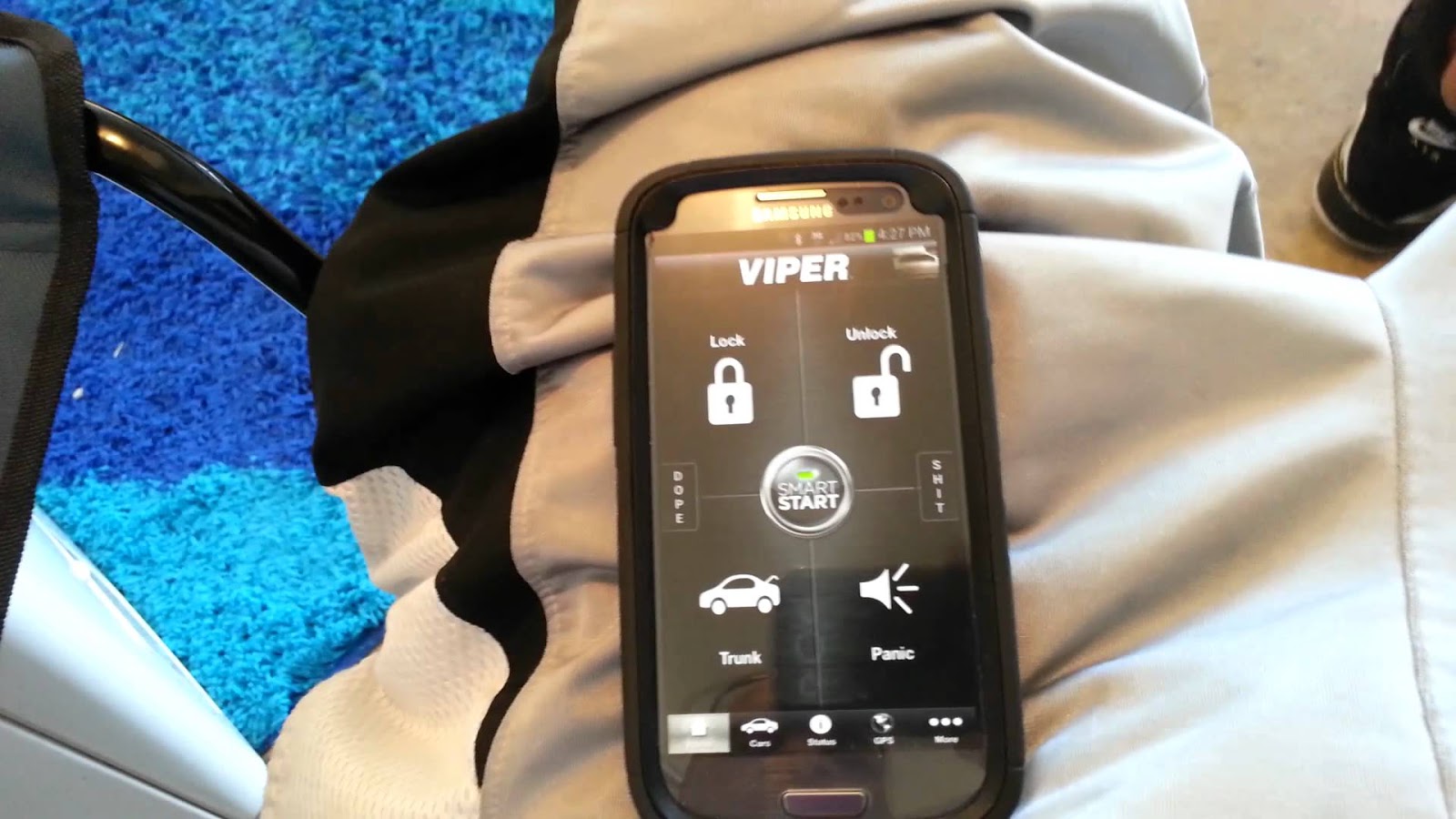
Unlock and lock your car

Say, what? Yes, you can totally lock and unlock your car using your smart phone. With the Viper SmartKey module, you can unlock and lock your car without your keys. If you are afraid of losing your keys, you should definitely try the system.

Unlock and lock your car

Check your heart rate

Instant heart Rate app allows you to check your heart rate anytime. The apps turns your smart phone into a heart rate monitor. It gives you a detailed report when you place your finger on the lens of the camera of your phone for 1 seconds. 

Check your heart rate

Project map on your windshield

Using the GPS while driving can be really unsafe especially when you are driving in the dark. Hudway is an app that projects the GPS enabled map on the windshield of your car. You don’t need any extra equipment, simply download the app and enter the destination and you can see the directions directly on your screen.

Project map on your windshield

Check for dead batteries

Did you know that you can check whether the batteries of your remote control are dead or not? If pressing the buttons and hitting your remote control hard on your palm doesn’t work, it’s time to check if the batteries are working or dead. Take your phone and open the camera app; now bring your remote control in front of the camera and press a button. If you see a pinkish or purple light emitting from the top of the phone, it means the batteries are fine and if the light is faint or hardly there, you should get up from the sofa and get some new ones.

Check for dead batteries

If you are looking to buy mobile accessories, look no further. At owogroup.com, you will find a myriad variety of mobile phone accessories that you can shop online at best prices. 

Saturday, 6 August 2016

Using your phone excessively? Beware of these hazards

Every once in a while, you must have come across the phrase that excessive use of mobile phones has bad effect on your health. But let’s admit it; keeping your phone away is not the solution since this little gadget runs lives. Even though we come across such facts, we tend to ignore them as what harm could our phone possibly cause us? Sorry to burst your bubble, but your innocent looking mobile phone is putting your health at risk. 


Using your phone excessively can cause your stress levels to rise leading to depression, sleep disorders and what not. With its constant ringing and vibrating, your phone is not really helping where the state of mind is concerned. It triggers mental health problems and does more harm than good.

We all know that handling your phone while driving is illegal and there is a logical explanation behind it. By using your phone while driving, you are taking up your chances of road accidents by four times. It is one of the biggest threat mobile phones pose.

Our phones are emitting radio waves all the time and when you use your phone, these waves are directed towards you. And radio waves are known to cause cancer and infertility in extreme cases. 
Do you have a chronic pain in your arm or your thumb? Little did we know, it is our phones that are causing such chronic pain. If you text regularly or spend hours scrolling down your social media, you are likely to suffer from pain in your thumb and holding your phone for longer periods will cause pain in your arm. 

Now what exactly can be done to avoid the harmful effects of your phone?

The first thing that will come to your mind will be using your phone less. But since it keeps us connected to our friends and work, it is nearly impossible to stay away from your phone. However, there are gadgets that can help you maintain distance from your phone and stay connected to it at the same time. Yes, we are talking about wireless gadgets. Invest in some good quality stereo Bluetooth headset that will enable you to take your calls or listen to music while maintaining a safe distance from your phone. If not entirely, it will help you to a considerable extent. Get your stereo Bluetooth headset from owogroup. 

Monday, 1 August 2016

Dropped your phone into water? Here’s how to fix it


Accidents can happen with anyone, anytime and anywhere. What you do after the accident, counts. So did you drop your phone in water? Stop panicking because the chances are that you can still save your phone from any damage. It depends on how fast you act. The sooner you act, the better chances there are for you to recover your phone. As soon as you take out your phone from the water, follow the steps mentioned below to fix it. 

1. The first thing you have to do is turn it off. No, don’t check whether it’s working or not; simply switch it off.


2. Now that phone is off, open the back of your phone and take out the battery, micro SD card and sim card. While you do it, make sure that the water doesn’t move to prevent it from going deeper into your phone’s system.


3. Now take a tissue and start wiping the insides of your phone to dry it. If there’s water in the corners you can’t reach, use a vacuum cleaner to suck the water out of those pesky corners.

4. After you are done, take a ziplock bag and fill it with uncooked rice and bury your phone in it. The uncooked rice is great moisture absorbent and will dry up your phone.


5. Wait for 2-3 days and do not check your phone in between. The process takes time and you have to be patient for it to work.

6. After few days, take out your phone and put the battery and turn it on. If it doesn’t work, try charging your phone.

7. If it doesn’t work after charging, try replacing the battery as might be damaged. And if replacing the batteries doesn’t work, get your phone repaired by a professional. 

Take care not to shake, bang or push any buttons on your phone right after you take it out of your water. And using a blow dryer would be a bad idea too as it would simply heat up your phone. Stick to the above mentioned steps and you might be able to save your phone.

Visit owogroup to shop online for best mobile accessories at great prices.