Showing posts with label Online Store. Show all posts

Monday, 12 September 2016

What is USB OTG and why do you need it

You might be familiar with the USB but have you heard about USB OTGs? While they are really common but not many people are aware of them and their uses. Some might even mistake it for a basic cable but its more than just a basic cable. If you have no idea what it is and its purpose, look no further, here is all you need to know about USB OTGs.

USB OTG

What is USB OTG?

Basically, USB OTG or USB On-The-Go lets you connect your smartphone or tablet to all the other external devices like another smartphone, external keyboard, pen drives and mice. With OTGs, you can connect your smartphone to other smartphones and exchange files, you can connect pen drives to store your phone’s data and it can connect and external keyboard to your phone for convenient typing. These cables are quite versatile and highly useful for the purpose of storing and exchanging files.

 Its uses

Extra storage

Smartphones usually come quite less storage which is not enough for all of our pictures, music, videos and applications. And even if you do manage to put it all together by getting an external memory card, it feels like a clutter and finding things in your phone gets frustrating. A good idea would be to store your things in a USB to keep your data safe and sorted and that can be done using an OTG.

Extra storage

Add extra hardware

Need to type and mail that essay quickly but those tiny alphabets on your phone’s screen are testing your patience? Connect an external keyboard to your smartphone and that’s one less problem for you. USB OTGs let you connect additional hardware to your mobile phone for better usage. Think about how easier it would be access the content on your pen drive with a simple cable. You can save tons of space in your phone by transferring files to a pen drive through USB OTG.

Add extra hardware

Head to owogroup.com and browse through our collection of OTG pen drive and grab yours soon.

Tuesday, 6 September 2016

Bored? Visit these interesting websites

Bored out of your wits? There a limit to which we can watch movies and play games on a lazy Sunday afternoon to kill time. Internet is a great source of internet is you ask us. Here are few of the interesting websites that you will definitely like.

Textastrophe.com

If you want some good laughs, head to this website and you won’t be disappointed. The owner of the website texts random people by taking their contact information from Craigslist ads and posts the screen shots of these texts on the website. It is a source of amusement as well as a lesson why you shouldn’t share your personal information online. 

 Textastrophe.com

Isitnormal.com

We are curious beings and more often than not, weird question pop in our heads without any reason but since they sound too stupid or embarrassing, we bury them in the deepest corners of our mind and forget about them. isitnormal.com is a website where you can ask anything and read the questions posted by others too. Nobody will judge you on the website. 

Isitnormal.com

Reasonsmysoniscrying.com

Kids are like little drunk people, they do inexplicable things and cry over things that will crack you up. Parents from all the corner in the world share different and hilarious reasons why their kids are crying. 

Reasonsmysoniscrying.com

Usefulscience.org

For science fanatics out there, it’s a great source of learning as well as killing some time. On the website, you will find single line summaries of research published in scientific journals.

Usefulscience.org

Thisiswhyimbroke.com

Are you a sucker for collecting unique things? The website is dream come true for you, here you will find all kinds of things that you could never think of. The products range from rom Oreo Dunking Spoon, Magic Wand Remote to Wearable sleeping Bags and you can buy them. 

Thisiswhyimbroke.com

Shop online for the best mobile phone accessories like phone cases, tempered glass screen protectors, iPhone horns and more from owogroup.com.

Friday, 2 September 2016

How to renew your old smart phone

Watching people getting new phones while you are still using your old phone can really fire up your jealousy. Scratches, fading paint and bruised corners mark that phone is old and has been well used by the owner. But buying a new phone just because your current phone looks old is not a valid reason for most of us. there are, however, few things you can do to make your phone look and feel like its new; here are few tips that might help you.


Tempered glass

We use our phone all the time and all the friction and constant usage causes scratches on its screen which can make your phone look old. By replacing the screen protector of your phone, you can change the appearance of your phone. the screen will look sleek and shiny just as it was when you first bought it.

Tempered glass

Phone case

If you avoided using a phone case in the past, your phone must be looking all old and weary by now and the paint must have peeled off from its edges. But since you are not going to a new phone anytime soon, buying a phone case is a great way to hide all the damage. 

Phone Cases

Clean it

A dirty phone is not a pleasant sight and even if your phone is not old, you should regularly clean your phone. dirt and grime might be the reason your phone is looking as old as time. clean your phone thoroughly and it will instantly look better.

Clean it

New theme

Now, your phone might be looking better from the outside, why don’t you jazz it up its insides too? Download a new theme or launcher for your phone and put up new widgets and icons. You will feel as if you are holding a new phone in your palm.


Visit owogroup.com to buy mobile phone accessories like tempered glass and phone cases at best prices. 

Monday, 29 August 2016

Blinklist- read books in 15 minutes

Reading is a joy of its own kind; losing yourself in words that take shape in your mind and create a world unknown to humankind is inexplicably blissful; book worms will relate. But with the fast-paced life of today, we hardly get time to indulge in our favorite books. And talking about time,how much time does it take you to finish a book? Few days? A week? A month, perhaps? With Blinklist, you can finish a book in 15 minutes.

Reading is a joy of its own kind

The app paraphrases non-fiction books so that the reader can absorb the essence of a book in 15 minutes. the books are briefed by experts in the subjects of finance, history and science to bring out the most important information so that the reader can get full value from reading the paraphrased version of books. the information is arranged in a manner that it delivers the most important information with deep insights. Each chapter of the book is summarized in 250 words and all you need is 15 minutes of your time to finish it. 


However, you need internet connection to run the app and you can create a library of your own. Other features of the app let your highlight the parts of the book that you want to remember and some of the books are also available in audio book format so that you can understand the text better. 


The app is great for those who have little to none time for reading but want to satisfy their hunger for knowledge. With the help of the app, you can decide whether or not you want to buy the book. It’s especially helpful for those who find short, briefed pieces of information helpful instead of details.


Shop online for mobile accessories like phone cases, bumpers, Bluetooth earphones and car mobile holders from owogroup.com at best prices. 

Genius tech hacks

We live for handy life hacks, don’t we? They make our lives easier and the internet is full of these little tips and tricks. You can solve any problem by employing them in your daily life. Here are few tech hacks that will make cleaning your keyboard and protecting your charger cords easier. 

Genius tech hacks

Clean your keyboard

Cleaning a keyboard is a tricky business but it can be made easier by employing a simple trick. Before you throw away your used sticky notes, use the sticky part of the note to clean the keyboard. 

Clean your keyboard

Nail paint and washi tape to decorate chargers

Your chargers don’t have to look boring and you can jazz them up using nail paint and washi tapes. Simply paint the plastic part of your charge and if you are using washi tapes, wrap it around your charger and you can go as far as wrapping it around the cord as well.

Amplify sound

You can amplify the sound of your phone by simply placing it in a glass cup or paper, plastic cup. 


Protect the cords

How often do you have to buy a new charger because the cord of your last charger broke? To protect the cord from breaking, wrap a spring around it and it will prevent your cord from bending too much. 


Pause YouTube videos

You don’t have to look for the little pause button on the YouTube video to pause it anymore. Simply press K and it will pause the video no matter where you last clicked. 


Log out of Facebook

Blame it on the habit of staying logged in to Facebook in your phone, you often forget logging out of other devices. And god forbid if someone gets hold of your account. You can log out of any device with a simple trick. Go to settings in your Facebook account and then security>When you’re logged in. It will show you all the sessions that are open and you can log out from any of them. 


Visit owogroup.com to shop online for latest mobile phone accessories like phone cases, Bluetooth earphones, bumpers and car mobile holders. 

Friday, 26 August 2016

Must have apps for women

you probably have ten other things on your mind while you are reading this; your manicure appointment, picking up your laundry and maybe shopping sometime later. There are so many things you have to take care of and with so much to do in so less time, you hardly get time for yourself. But life doesn’t have to be a hectic rollercoaster ride and especially when you have a mini helper in your pocket. there are many android apps that can solve half of your problems in a jiffy, here are few of them that you might like. 

apps for women

Myles

need a car to explore the city? Myles is the app that lets you rent a car to drive around in few clicks. You can go anywhere you like and the kilometers don’t count. With this app, you will not have to depend on others to go anywhere.

Myles

 Roposo

Roposo is an app that lets you stay updated with the latest trends in fashion and lifestyle. You can share your fashion stories and make a list of products or stories that you like. Also, you can follow the people whose styles you like. 

 Roposo

UrbanClap

You don’t need to record phone numbers of plumbers, electricians and photographers in your diary ever again; UrbanClap provides you with all the services you might need from repairs to instructors in few steps. 

UrbanClap

Pluss

It is a handy app for those who don’t have a pharmaceutical or healthcare store near their house. Pluss is an app that provides you healthcare and pharmaceutical products and deliver it to your house. you can easily place an order and the stores associated with delivering the products are trustworthy.

Pluss

Timesaverz

Timesaverz is your solution to any household problem that may come your way. You can call an electrician, carpenter, plumber and even the laundry service in few minutes. With the app, household maintenance will become twice as easy.

Timesaverz

 Visit owogroup.com to buy latest mobile phone accessories at best prices. 

Monday, 22 August 2016

Best apps for students

Being a student is not easy; ever increasing pile of notes, project deadlines and the dreaded exam take most of your time and there’s none left for other things. You are always struggling with trying to keep up with your syllabus while squeezing some social life in your schedule. but it doesn’t have to be this difficult when you have a mini helper in your pocket. Your smartphone is a portal to a simpler life and it can also simplify your life as a student too. Here are few apps that you might find helpful if you are a student.


Coursera

If you are one of those people who is thirsty for knowledge, Coursera is the app for you. Coursera.org is a site that has many courses on different subjects that you can take. These courses are designed with the collaboration of top colleges and universities in US. extra knowledge always comes handy and with Coursera, you can take up a course anytime and the qualifications required are minimum. 

Coursera

Exam vocabulary builder

Having an intensive vocabulary is important and it helps you in all the spheres. But learning the whole dictionary is not a practical option. Exam vocabulary builder will help you build your vocabulary for exams like TOEFL and IELTS. To make it easier, the app has different modes like study, quiz and flashcards. The app uses the spaced repetition technique to help you retain whatever you learn.

Exam vocabulary builder

Quizlet

Quizlet is an app that helps you learn better using flashcards. These flashcards are study sets that are made by students on a variety of subjects. If you can’t find the subject of your choice, you can make your own study set. 
Quizlet

Evernote

Evernote is a note making app that you should definitely have if you are looking for a decent note making app. The app allows you to bookmark, compose and clip your notes. Apart from that, the app also helps you manage your to-do list. 

Evernote

Visit owogroup.com to buy the best mobile phone accessories like earphones, phone cases, pen drives and more. 

Friday, 12 August 2016

Stay safe, set up ICE contacts in your Smartphone today

When you leave your house, there’s no guarantee that will come back home in one piece. Accidents can happen to anybody despite the number of precautions you take. Every day you hear about people getting injured in accidents and count yourself lucky that it wasn’t you, but you never know when it’s going to be your turn. But that doesn’t mean you should leave it all to fate; even though you have no control over you fate, you should take precautionary steps anyway. Setting up ICE contacts in your phone is one such step you should take. 

Stay safe, set up ICE contacts in your smart phone today

ICE? What is that?

To begin with, ICE stands for In Case of Emergency contacts. These are the contacts that will help you in an emergency. If you are in some emergency, you can contact your ICE contacts to get help and if you are found unconscious, the person who found you can look up your contact list and call your ICE contacts. It is really important to have ICE contacts saved in your phone and make sure you have more than one or two ICE contacts; in case the first person doesn’t respond, you can reach out to other people in your ICE contacts.

ICE
Who should be in your ICE contacts?

The answer is quite simple; people who are close to you like your family, spouse, roommate or a close friend should be in your ICE contact list. As they are close to you, they must be aware about your medical conditions and in case they are required to answer about your medical history, they can correctly answer. 

ICE contacts

How to save these contacts?

It is obvious that if you are found unable to speak or stay conscious during an emergency, the person who found you will not be able to comprehend who to call from your contact list. For this reason, you should save the ICE contacts like “ICE-John” or “ICE 1”, “ICE 2”. It will make it easier for your savior to contact your closest people. 

ICE apps

ICE apps


Now if your phone is password protected, the contact list won’t be of any help as your phone will be not be accessible to anybody else but you. But don’t fret, there a solution for that too. Simply download ICE apps that show your ICE contacts on your locked screen in case of emergency. 

Visit owogroup.com to shop online for best mobile accessories at great prices. 

Wednesday, 10 August 2016

Cool things you didn’t know your smartphone could do

Your smart phone can do almost everything from making a call to fetch you a date. But you are yet to find out the potentialities of your smart phone. As it turns out, there are numerous of incredibly smart things your smart phone can do. Read on to find few cool things your smart phone can do. 

Smartphone

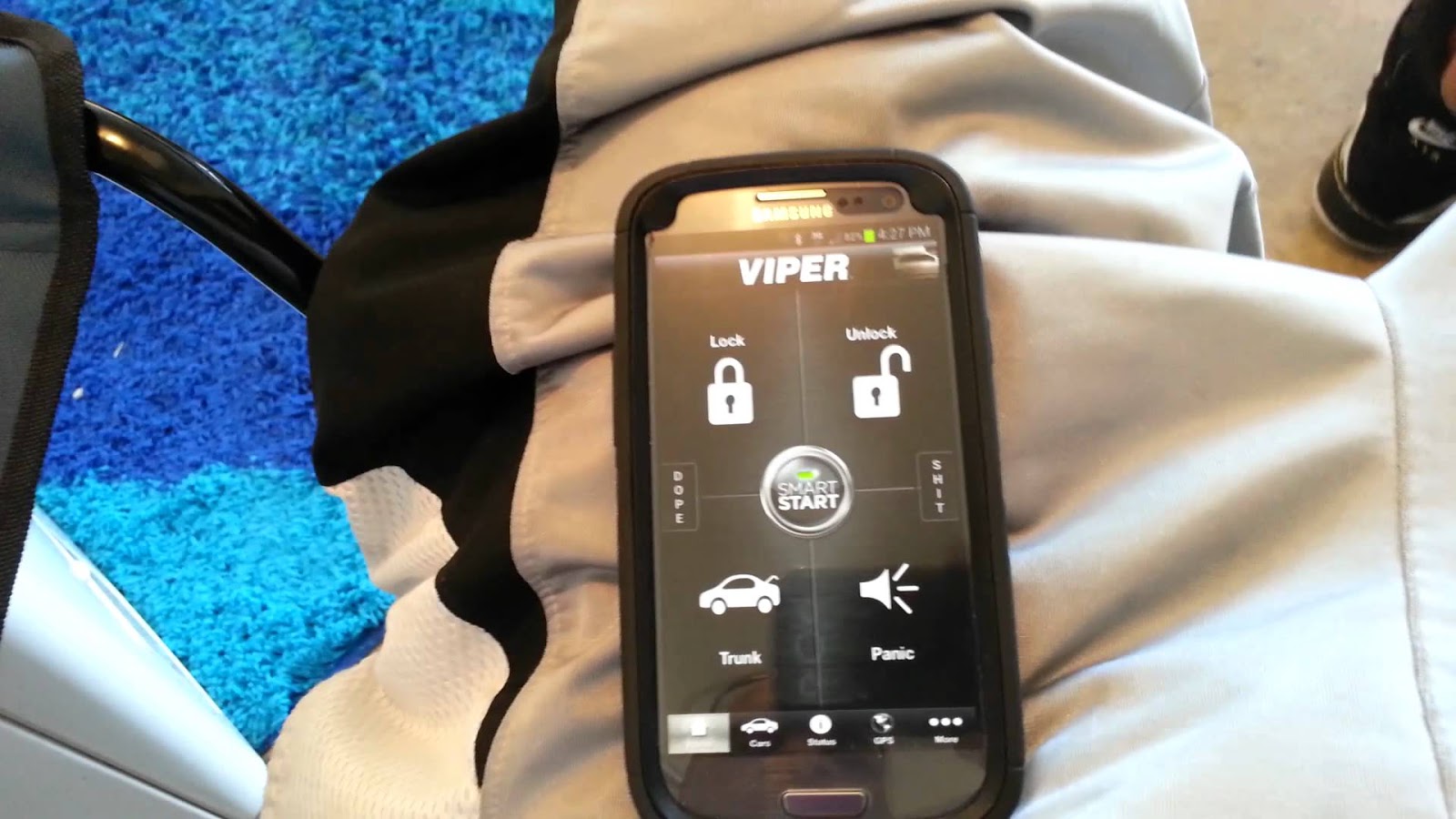
Unlock and lock your car

Say, what? Yes, you can totally lock and unlock your car using your smart phone. With the Viper SmartKey module, you can unlock and lock your car without your keys. If you are afraid of losing your keys, you should definitely try the system.

Unlock and lock your car

Check your heart rate

Instant heart Rate app allows you to check your heart rate anytime. The apps turns your smart phone into a heart rate monitor. It gives you a detailed report when you place your finger on the lens of the camera of your phone for 1 seconds. 

Check your heart rate

Project map on your windshield

Using the GPS while driving can be really unsafe especially when you are driving in the dark. Hudway is an app that projects the GPS enabled map on the windshield of your car. You don’t need any extra equipment, simply download the app and enter the destination and you can see the directions directly on your screen.

Project map on your windshield

Check for dead batteries

Did you know that you can check whether the batteries of your remote control are dead or not? If pressing the buttons and hitting your remote control hard on your palm doesn’t work, it’s time to check if the batteries are working or dead. Take your phone and open the camera app; now bring your remote control in front of the camera and press a button. If you see a pinkish or purple light emitting from the top of the phone, it means the batteries are fine and if the light is faint or hardly there, you should get up from the sofa and get some new ones.

Check for dead batteries

If you are looking to buy mobile accessories, look no further. At owogroup.com, you will find a myriad variety of mobile phone accessories that you can shop online at best prices. 

Wednesday, 3 August 2016

Learn how to use your smart phone smartly

Are you up for learning genius hacks about your mobile phone? We have for you, genius tips and tricks that will surely come in handy the next time you are having troubles with your smart phone. From saving its battery to charge it faster; you will definitely thank us later for them.

1. Dirty hands? No biggie; put your phone in a plastic sandwich bag to prevent it from getting dirty with all the sweat and grime on your hands. It will keep your phone clean and you will still be able to use it.


2. How many hours do you spend looking for your car in a huge parking lot? Probably enough to drive you crazy. Instead of promising that you won’t forget the location of y our car this time, take a selfie where you parked your car so that you can easily find the spot.


3. When you go to a concert, making a video of the show is mandatory; but watching the video later is really annoying with all the people screaming in the background. To avoid recording the earsplitting noise, simply cover the microphone of the phone. The video will sound clearer.


4. The battery of our smartphone runs out quicker than a bag of chips nowadays, honestly. To save your battery while using the GPS to find a place; takes a screenshot of the map and turn off your mobile data. This way you will save the battery as well as the mobile data.


5. In a hurry but your phone is taking forever to charge itself? Here a trick; switch your phone to airplane mode and it will charge with double speed.


6. Did you know that you can use your phone to carry extra cash or your credit/debit cards? Place your money or your cards between your phone and phone case to carry your valuables discreetly.


Looking to buy mobile accessories online? Visit owogroup to shop mobile phone accessories at great prices online.